
🏪 Store
VORP RSG TPZ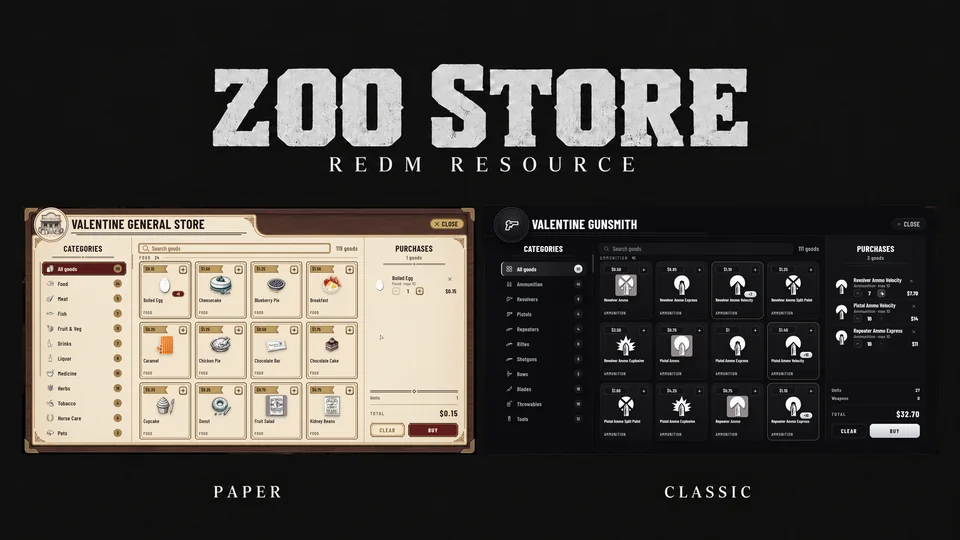
General stores and gunsmiths for VORP, RSG and TPZ, and stores that players own, stock and price themselves.
Install
Put the
zoo_storefolder inresources/[zoo]/.Open
config/config.luaand setConfig.Frameworkto'vorp','rsg'or'tpz'.Add this line to
server.cfgafter your framework (its core and its inventory) andoxmysql:iniensure zoo_storeDo not run the framework's own stores at the same counters (
vorp_stores,rsg-shops,tpz_stores). They put shopkeepers, blips and prompts in the same places.RSG and TPZ only. zoo_store writes its items into your framework's item file, so
server.cfgmust allow it (anywhere before the server finishes starting). Add the line for your framework:iniadd_filesystem_permission zoo_store write rsg-coreiniadd_filesystem_permission zoo_store write tpz_inventoryStart the server. On the first start zoo_store makes its database tables and adds its items (the three permits and the tax ledger) where your framework keeps items. The inventory reads its items only when it starts, so restart the server once more before giving them out. The console says so when it added any.
Copy the pictures in
img/items/(permit_general.png,permit_gunsmith.png,permit_trading.png,tax_ledger.png) into your inventory's picture folder:vorp_inventory/html/img/items/,rsg-inventory/html/images/ortpz_inventory/html/img/items/.
Creating stores
There are three kinds of store.
The server's own stores
They are written in the stores file of your framework: config/shops_vorp.lua, config/shops_rsg.lua or config/shops_tpz.lua. To add one, copy a store in that file and change:
id: a unique namenametype:generalorgunsmithcoords: where players open itnpc: its shopkeeper and map icongoods
Restart zoo_store after editing.
A player's store, with a permit
- Give the player a permit:
permit_general(general store),permit_gunsmith(gunsmith) orpermit_trading(trading post, sells everything). - The player uses the permit from the inventory. A ring appears on the ground in front of them.
- They walk the ring to the spot and press Enter to place the store (X cancels).
- They name the store, and may give their own Discord webhook to get its messages.
- The store is theirs: hold G at it to open it, stock it, price it and run it.
A character may own Config.MaxPerCharacter stores (1 out of the box).
A store for sale, placed by an admin
- An admin types
zoostore_salein game. A ring appears on the ground in front of them. - They walk the ring to the spot and press Enter to place it.
- They pick its type (general store, gunsmith, trading post), its price, and its tax in percent (empty: the tax of every store).
- It shows on the map as "Store for sale", with its price over its prompt.
- A player holds G at it, reads its type, price and tax, names it (and may give a Discord webhook) and buys it with cash. It is then their store, like any other.
An admin who holds G at a store for sale also sees Take off sale, which removes it (a second click confirms).
Who is an admin
An admin is a player whose group in the framework is one of Config.AdminGroups in config/config.lua (admin and god out of the box). On VORP that is the account's or the character's group, on RSG a permission rank, and on TPZ the player's group.